CRM Integration for Marketing Automation: A Complete Guide
 General
CRM integration for marketing automation is the difference between a sales team guessing which leads to call and a sales team working from live, accurate data. When a CRM and a marketing platform run as separate systems, leads slip through the gaps between them, follow-ups get delayed, and sales and marketing reports never quite agree. This guide covers what that connection actually solves, the features worth checking before you buy, and how syncing leads across marketing channels keeps every team working from the same record.
Key Takeaways
- Connecting a CRM and marketing automation platform removes manual data entry, so every lead capture, score, and stage change updates automatically across systems.
- The best CRM integration for marketers connects ad clicks, form fills, and email replies into one lead record in real time, not overnight.
- AI driven lead generation software uses that connected data to route and nurture leads without a marketer copying rows into a spreadsheet.
What CRM Integration Means Inside a Marketing Automation Platform
In practice, it means a lead's marketing history and sales record live in one connected system instead of two disconnected tools that someone has to reconcile by hand. A prospect fills out a form, clicks a retargeting ad, or opens three emails, and that activity should appear on the same record the sales team sees in the CRM, without an export, an import, or a Zapier workaround that breaks every few months.
Most SMB marketing stacks did not start this way. A team picks a CRM for sales, then bolts on an email tool, then a landing page builder, then an ads platform, and each one holds its own partial picture of the same customer. That is exactly what CRM integration for marketing automation inside a single AI-powered platform is built to solve: SEO, paid ads, social, CRM, and reporting run on shared lead and customer data from day one, so integration is not a project you fund later, it is how the platform already works.
Why Sales and Marketing Teams Need Connected Data
A CRM alone tells a sales rep who a contact is. It rarely tells them what that contact has done in the last thirty days, which ads they clicked, which page convinced them to fill out a form, or how many emails they have already opened. Marketing automation without CRM integration has the opposite problem: rich behavioral data with no easy way to hand a qualified lead to sales at the right moment.
Connected data changes both sides. Sales reps open a contact and see the full journey, campaign source, page visits, and email engagement, before they ever pick up the phone. Marketers see which campaigns actually closed revenue, not just which ones generated form fills. The impact shows up in the numbers: 91% of companies with ten or more employees now rely on a CRM system to manage customer data, and the gap between companies that connect that CRM to marketing and those that do not keeps widening every year.
This is also where AI driven lead generation software earns its keep. Instead of a marketer manually deciding which channel to double down on, the platform reads closed-revenue data flowing back from the CRM and adjusts targeting, budget, and follow-up sequences on its own. A lead source that quietly outperforms on revenue, not just on form fills, gets more budget automatically instead of waiting for someone to notice it in a monthly report.
Core Features to Look for in an Integrated CRM and Marketing Automation Tool
Not every platform that claims deep CRM and marketing automation integration delivers the same depth. A few features separate a genuinely connected system from a bolted-on sync.
Real-time, two-way sync matters more than most buyers realize. One-way sync from forms into a CRM is common and only solves half the problem; a lead's CRM stage changes, like moving from qualified to demo booked, should trigger marketing automation in return, not just the other way around. Built-in lead scoring that blends demographic fit with behavioral intent gives sales a ranked list instead of a raw one. Native email, ad, and social sync means campaign attribution stays accurate without a separate analytics stitching layer.
A short checklist worth running through before signing any contract:
- Does the sync run in real time, or on a scheduled batch that can lag by hours?
- Does a CRM stage change trigger marketing automation, not just the reverse?
- Is lead scoring built in, or does it require a separate paid add-on?
- Does the vendor charge extra per integration, or is CRM sync included in the base platform?
Teams still comparing options should read through this breakdown of marketing automation buying criteria for SMBs before shortlisting vendors, since CRM depth is one of the criteria that is easiest to overlook in a demo and hardest to fix after signing a contract. It is also worth understanding why a unified marketing software platform with CRM built in tends to outperform a stack of specialist point tools stitched together after the fact.
How Leadmetrics Syncs Leads Across Marketing Channels Automatically
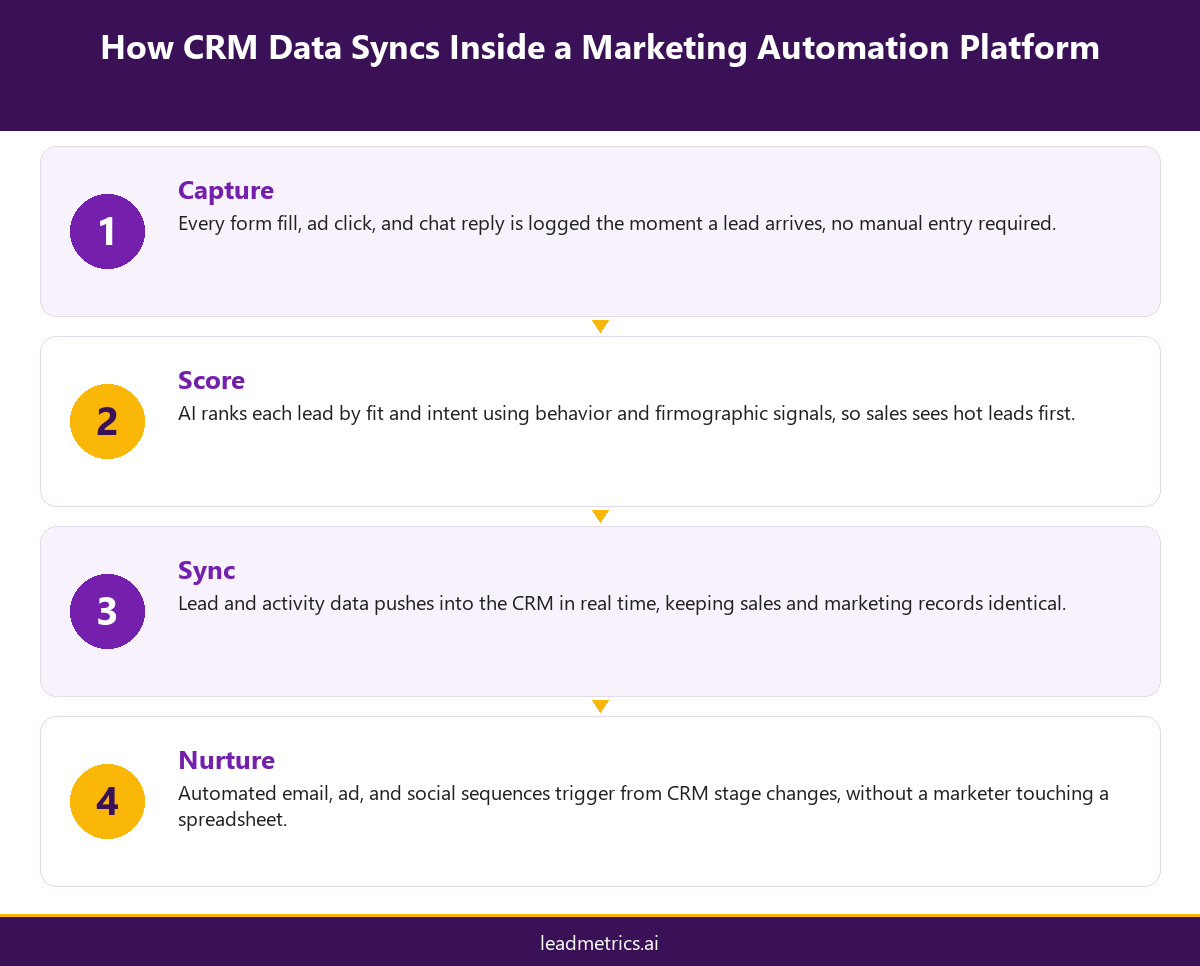
Leadmetrics treats syncing leads across marketing channels as core infrastructure, not an add-on integration. Every touchpoint, a Google Ads click, a Meta form fill, an organic search visit, or a chat conversation, writes to the same lead record the moment it happens. From there, AI lead scoring ranks the lead using both demographic fit and real-time behavior, so sales always works the most promising contacts first instead of a random queue.
That connected loop pays off in measurable ways. Research on CRM-driven sales workflows shows that businesses that connect CRM data to their campaigns see conversion rates rise by as much as 300% compared to teams running marketing and sales data separately. On the Leadmetrics platform, that connection also feeds ROI reporting automatically, so a founder or marketing lead can see cost per lead and pipeline value by channel without pulling data from four different dashboards.
That same reporting layer makes it easier to justify budget decisions to a board or a co-founder, since every dollar spent on ads, content, or GBP management traces back to a pipeline number instead of a vanity click metric.
Common CRM Integration Mistakes and How to Avoid Them
The most common mistake is treating integration as a one-time setup instead of an ongoing part of the platform. Custom fields drift, lead sources stop mapping cleanly, and six months later nobody trusts the CRM data anymore. The fix is choosing marketing automation with built in CRM sync rather than a third-party connector that needs its own maintenance.
The second mistake is syncing contact records but not activity history, which leaves sales with a name and no context. The third is ignoring lead scoring entirely and syncing every lead at equal priority, which buries the leads worth calling first under a pile of low-intent form fills. A fourth, easy to miss until it causes a real problem, is letting duplicate records pile up when the same lead fills out a form twice under a slightly different email address, which quietly inflates lead counts and undermines trust in the dashboard.
Each of these is a configuration choice, not a limitation of integration itself, and each is avoidable by picking a platform where connecting CRM and marketing automation was part of the original design, not a feature added after the fact.
Conclusion
CRM integration for marketing automation is not a nice-to-have add-on, it is what makes lead scoring, automated nurture, and accurate ROI reporting possible in the first place. Teams that connect their CRM and marketing data stop losing leads in handoffs and start working from one shared source of truth. If your current stack still requires manual exports between marketing and sales, it is worth seeing what a genuinely connected platform looks like. Talk to the Leadmetrics team to see it in action on your own data.
Frequently Asked Questions
What is CRM integration for marketing automation?

Does marketing automation with built in CRM cost more than separate tools?
How does syncing leads across marketing channels improve lead quality?
Can small teams benefit from CRM integration, or is it only for larger companies?
What is the best CRM integration for marketers who already use multiple ad platforms?
Does AI driven lead generation software replace the need for a CRM?
How long does CRM integration typically take to set up?
What happens to old leads when you switch to an integrated platform?
Is a free trial available to test CRM integration before committing?
Where can I get a review of my current CRM and marketing setup?